


Luma: Events & Invites
4.936.00 Reviews
App Specs
- Version
- 2.3.1
- Updated On
- License
- Free
- Downloads
- 500,000+
- Developer
- Luma Labs, Inc.
- Categories
- Events
- Platform
- Android
Screenshots


 Analysis by AppCompare
When I’m arranging a get-together, the hard part is rarely picking a date; it’s turning that decision into one clear invitation and keeping everyone on the same page. Luma: Events & Invites is built around that organizer’s job. I’d consider it when a gathering deserves more structure than a stream of messages, but I’d still choose a simpler option for a plan that takes only one text to explain.
Start with the kind of gathering you actually have
I find an event app most useful when the plan involves several moving parts: a time people need to remember, a place that may be unfamiliar, and guests who will respond at different times. That could mean coordinating a birthday dinner, a neighborhood meetup, or a small work gathering. The payoff is less about making the event look elaborate and more about giving the group a shared reference point.
Luma is an events app from Luma Labs, Inc. It is free, has a Teen age rating, and its current version is 2.0.8. It has a 4.7 average from around 266 ratings and over 100,000 installs. Those figures suggest that people have found it useful, but I would treat them as context rather than proof that it suits every kind of host. The key question is whether you want an event-centered space instead of relying on scattered chats.
Build the invitation around decisions guests need
My practical advice is to settle the essentials before inviting anyone: the date, the time, and the location. Luma lets a host set those details and add a map link, which is especially helpful when a venue is hard to describe in a short message. A map link can reduce the familiar back-and-forth of “which entrance?” or “is this the right place?” It cannot resolve every travel question, so I’d still include a plain-language note when there is a useful landmark or a specific arrival instruction.
Custom images and themes give an invitation a more personal feel, but I would treat them as finishing touches. A polished design cannot compensate for a missing time or a vague location. For a casual gathering, a simple invite with precise details is usually kinder to guests than an ornate one that makes them hunt for the basics.
That distinction also helps when deciding how much effort to spend setting up an event. For a small dinner, I would prioritize clear logistics and quick RSVPs. For a celebration where the invitation sets the mood, an image or theme may be worth the extra attention. In either case, the useful test is whether a guest can understand the plan at a glance.
Use RSVPs to manage the handoff from host to guests
Once the invite is ready, Luma supports adding people from phone contacts or entering them manually. Contact importing is convenient when the guest list is familiar, while manual entry gives me more control if I’m inviting only certain people or keeping the list deliberately small. Before sending, I’d review every recipient: a minor selection mistake is easy to make when moving quickly, and a clear guest list is part of making the invitation feel personal rather than indiscriminate.
Worth Reading Before You Choose

Switching to Android Auto Means Rethinking Your Driving Routine

Google Calendar Makes a Crowded Week Easier to Manage

Baby Panda World Brings Quick Play to Modern Phones, but Its Game Library Feels Busy

ESPN’s Live Game View Makes Following Close Games Easier

QuizzLand Review: A Good Fit for Short Trivia Breaks, Not Every Player

Basketball Stars: Multiplayer Is Fast, but Can It Recover When Matches Go Wrong?
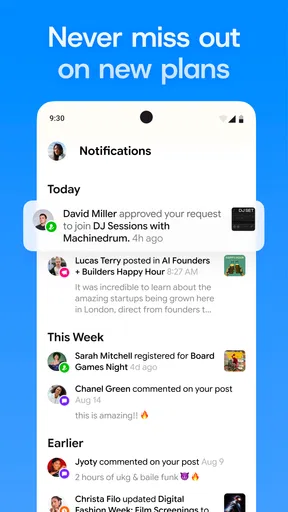
RSVP tracking gives the host a more organized view of who has accepted or declined, and notifications can surface changes without requiring a check-in message to every guest. For planning food, seating, or supplies, that is useful only if guests actually respond. I’d set a polite response deadline in the invitation or a follow-up message, then use reminders for those who have not answered rather than repeatedly nudging everyone.
There is still a human handoff here: the app can present the invitation and record replies, but it cannot make people read them or decide promptly. If someone’s attendance is essential, I would confirm directly rather than assuming that an unanswered invitation means either yes or no. That small distinction prevents a tidy RSVP screen from giving a host false confidence.
Keep coordination together, without expecting it to replace every chat
In-app messaging can keep event updates close to the invitation. If the venue changes or the start time needs a correction, having the conversation associated with the gathering is more useful than searching through unrelated messages. Group chat can also help when several people are co-hosting: one person can handle the guest list while another contributes to planning, without splitting every decision across separate threads.
Even so, I would not automatically move every conversation into a new app. Guests may be less familiar with it, or they may simply miss a message there when they normally check their usual chat service. I’d use Luma as the central place for event information and keep any urgent or time-sensitive change easy to notice. For a group that already coordinates smoothly in a shared chat, switching channels may create more friction than it removes.
After the gathering, and where the workflow can break
Sharing event photos and videos with attendees gives the plan a natural afterlife, especially when people want a common place to revisit moments from the day. Event insights such as attendance rates can also help a repeat host think about turnout next time. I would use that information as a rough planning aid, not a verdict on whether an event went well: a count cannot capture the quality of the conversation or why someone could not make it.
The workflow works best when a host is willing to make one space the dependable source for the event’s details. It can feel less convenient if guests prefer not to use another app, if the gathering is so informal that a quick group message is enough, or if the organizer expects an event tool to handle every calendar and communication habit automatically. I would also keep a backup note of essential logistics for myself, particularly if plans change close to the start.
Luma is an app in the Events category, and it was released on March 4, 2026. Its focus makes the most sense for people who regularly bring groups together and want invitations, responses, and event-related conversation to feel connected. If I were planning a one-off meetup with a small circle that already agrees on everything in chat, I’d skip the extra setup. If the event has a real guest list and details worth keeping organized, I’d give it a try.
Getting Started with Luma
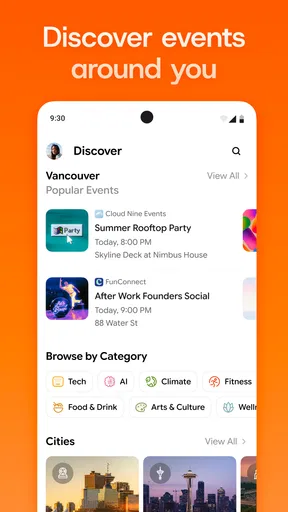
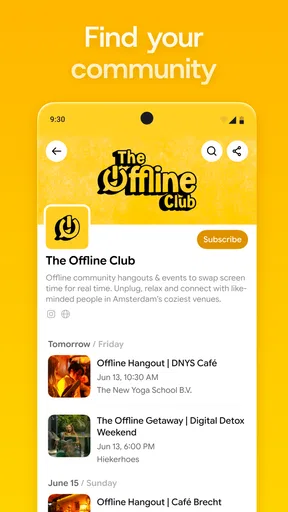
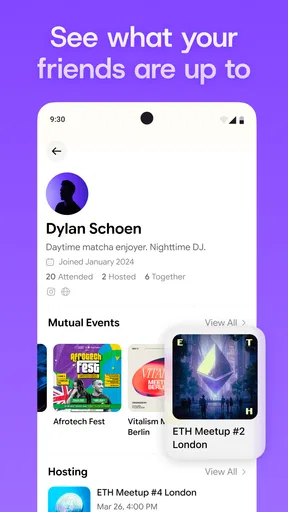
First off, downloading Luma was a breeze from both the Google Play Store and the App Store. As soon as you open the app, you’re greeted with a clean and intuitive interface. No clutter, just a straightforward layout that makes navigation a cinch.
Setting up your profile is quick and easy. The app asks for basic information, and you’re good to go. The focus here is on simplicity, so you won’t feel bogged down by unnecessary steps.
Creating Events
Creating an event with Luma is like having a personal assistant in your pocket. You can set up everything from casual get-togethers to more formal events. The app allows you to customize details like date, time, and location with just a few taps. One feature I found particularly useful was the ability to add a map link directly to the invite. No more getting lost on the way to the party!
Luma also lets you personalize your invitations with custom images and themes. This is a great touch if you’re looking to add a bit of flair to your invites.
Managing Your Guest List
Now, onto the guest list. Luma makes it super easy to manage RSVPs. You can import contacts directly from your phone or manually add them. Once your invites are sent out, you can track who’s attending and get notified when someone accepts or declines your invite. It’s like having real-time updates at your fingertips.
Another cool feature is the ability to send reminders to your guests. No more last-minute confusion about the event details—Luma has got you covered.
Communication Made Easy
One of the standout features for me was the in-app messaging. You can chat with your guests directly through the app. Whether you need to share updates or just want to hype up the event, it’s all there without having to switch to another app.
The app also supports group chats, which is perfect for event planning with multiple hosts. It keeps all your communications organized in one place.
Post-Event Features
Once the event is over, Luma still provides value. You can share photos and videos from the event with all your attendees. It’s a nice way to keep the memories alive and engage with your guests even after the party’s over.
Plus, if you’re a data enthusiast, Luma offers insights into your events. You can see metrics like attendance rates, which can help you plan better events in the future.
Final Thoughts
In a world where we’re all juggling busy schedules, Luma is a lifesaver for anyone looking to streamline their event planning. Its user-friendly interface, combined with comprehensive features, makes it a top pick for both casual and formal events. While it’s mostly smooth sailing, I’d love to see more integration options with other calendar apps in future updates.
So, if you’re tired of the event planning chaos, give Luma a try. It might just be the app you didn’t know you needed. Happy planning!
Pros
- Intuitive and user-friendly interface.
- Seamless integration with calendar apps.
- Customizable event themes and designs.
- Real-time RSVP tracking and notifications.
- Supports multiple event types and sizes.
Cons
- Limited offline functionality.
- Occasional sync issues with calendars.
- In-app purchases can be pricey.
- User interface can feel cluttered.
- Limited customization for free users.
FAQs for Luma: Events & Invites
What is Luma: Events & Invites used for?
Luma: Events & Invites is an app designed to help users effortlessly create, manage, and share events. Whether you're planning a small gathering or a large conference, Luma offers tools to streamline the process, including customizable event pages, RSVP tracking, and seamless communication with attendees. It's perfect for both personal and professional use.
Is Luma available on both Android and iOS platforms?
Yes, Luma: Events & Invites is available for download on both Android and iOS platforms. Users can easily find it on the Google Play Store and the Apple App Store, ensuring a wide range of accessibility for smartphone users looking to organize events efficiently.
Does Luma offer any integration with other apps or services?
Luma integrates with several popular apps and services to enhance your event planning experience. It can sync with calendars, social media platforms, and email services, allowing you to manage invitations and reminders seamlessly. This integration helps ensure that all your event details are organized and accessible in one place.
Is there a cost associated with using Luma?
Luma offers a free version with basic features suitable for small events or casual use. However, for more advanced features, such as detailed analytics and customization options, Luma offers a premium version. Subscription plans are available, and pricing details can be found within the app or on their official website.
How secure is my data on Luma?
Luma prioritizes user privacy and data security. The app employs robust security measures to protect your personal information and event details. Data is encrypted, and the app is regularly updated to address any security vulnerabilities, ensuring that your information remains safe and secure throughout your usage.


